( ESNUG 487 Item 10 ) ------------------------------------------- [12/08/10]
From: [ A Penguin of Madagascar ]
Subject: Solido caught a sneaky analog layout variation bug in our silicon
Hi, John,
Please make me anonymous.
We've been using Solido for 3 years to do our variation analysis and debug,
and have used it on 3 designs. Their tools are very stable. At one point
we used Solido to debug a low-dropout regulator (LDO) test chip that was
failing to perform in silicon. In particular, it was having problems at
cold temperatures. We used all three Solido packages, PVT+, Monte Carlo+,
and Proximity+, to find out which variation effect was behind the failure.
From a top level, these are the steps we took to uncover the problem:
1. Ran Solido's PVT+ analysis across 7290 corners to see if it passed.
(Yes, it passed.)
2. Ran Solido's Monte Carlo+ to see if it passed mismatch conditions.
(Yes, it passed.)
3. We ran Solido's Proximity+ package.
The chip failed this test and led to our finding the problem devices.
Details below.
Solido PVT+
Since this was our first time using Solido's PVT+ package, Solido worked
with us on site to enter the following list of combinations into the PVT+
GUI. We looked at the results in the PVT+ visualizer after the run was
complete. Solido trained us on how to use the selection and sorting in the
results table to characterize the 586 points that fell below our Phase
Margin spec.
We entered these combinations of input variables, defining 7,290 corners:
Temperature: -30.0, 25.0, 85.0
Cout: 1u, 4.7u, 10u
vLPM: 0.0, 2.5
VDA: 2.4, 2.5, 2.6
rload: 7.0, 10.0, 25.0, 50.0, 100.0, 500.0, 1K, 1M, 10M
VDD: 1.75, 1.8, 1.85
Modelsets: SS, FF, TT, SF, FS
We then set specs for our output measurements; our most critical one was
for Phase Margin. We then selected the "Full Factorial" setting to run all
combinations of corners.
Solido had several Design of Experiment (DoE) methods to choose from if we
wanted to run a subset of the corners in their PVT+ tool, but in our case
we decided to run all of them.
At first we thought we failed PVT+ analysis because we found 586 corners
fell below our Phase Margin minimum spec line. We selected all 586 failing
corners and flipped to Solido's simulation results view to analyze them,
sorting the tabular results by different input variables:
Our input variables were: vLPM, rload, VDD, and Modelsets. Below is the
characterization of the 586 corners.
* All were when vLPM was set to Low Power Mode
* with rload either 7 or 10 ohms
* At a variety of VDD and Modelset corners
We later realized that our setup was not quite correct, because the Low
Power Mode was not intended if rload is set below 100 ohms; the LDO in
Low Power Mode actually beat its 100 ohm spec, and handled a 25 ohm load.
So our LDO had passed the PVT+ test.
Solido MONTE CARLO+
Our next step was to run Solido's Monte Carlo analysis. We looked at 100
devices in the LDO that we felt would be mismatch sensitive. We selected
them in the Cadence schematic, and using Solido's "analyze mismatch"
function determined the LDO's sensitivities to statistical variation.
After reviewing Solido's plots, we saw that all specs were still in range
so we eliminated the possibility that mismatch variation caused the
silicon failure, i.e. our LDO passed the Monte Carlo+ test.
Solido PROXIMITY+
Finally, we took 50-100 devices into Solido's well proximity test, which
ordered the list according to sensitivity to proximity.
By checking the devices that Solido Proximity+ ranked as the most sensitive
from the top of this list against our layout, we found 2 devices that were
not symmetrical -- they were laid out at right angles instead of parallel
as they should have been. So in this case the fact that the chip failed the
Proximity test was good news. This was the bug we had been looking for.
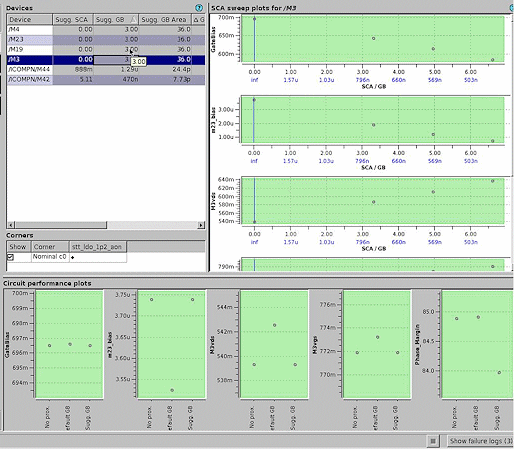
We corrected this problem and the chip then passed silicon. Below is a
snapshot of the Proximity+ results run showing our sensitive devices:
 Some additional feedback on Solido Monte Carlo analysis:
Our team debugged the LDO design. Most of my own experience has been with
Solido's Monte Carlo+ package. I have used it extensively, most recently
on our latest ADC analog to digital converter, 8-bit FLASH comparator.
Monte Carlo itself is not new, both Cadence Spectre and Synopsys HSPICE
have it. But Solido was the first to use Latin Hypercube to pick their
samples more intelligently than Monte Carlo analysis, yet still integrates
with the SPICE simulators to perform the simulation -- in our case, with
Cadence Spectre and Berkeley DA AFS.
I don't have hard numbers for speed comparisons but Solido's Monte Carlo+
is faster from the standpoint that we don't need to run as many simulations
to get better statistical sampling. Monte Carlo Random sampling is just
that; it's random, not smart. Latin Hypercube guarantees that we sample
at the outer edges of the bell curve resulting in fewer simulations and
more confidence in the results.
We need this better sampling in the 3 to 6 sigma area versus running random
Monte Carlo analysis. We always run at least 30 simulations, which is the
minimum to be statistically significant.
Cadence does Latin Hypercube too now. If Solido hadn't come along, I
suspect Cadence wouldn't have added it. And now Solido has added their
newer Optimal Spread Sampling algorithm (which I haven't used it yet).
Solido also gives you the results in more forms than the traditional Monte
Carlo tools. Normally you would just get a histogram with mean value and
standard deviation, but Solido also gives you the ability to plot the
function, and measure the specification.
For my analog chip, I was focused mostly on power and a little on area,
bandwidth, speed, offset voltages, distortions. Solido gives you
confidence numbers, e.g. 90% yield +/- 5%.
The other thing I found useful with Solido is if a particular Monte Carlo
condition is causing trouble, I can export it to a SPICE simulation. If a
Monte Carlo+ run shows poor performance, I can freeze the condition, then
rerun the simulation with those parameters set, set nodes, dive into design
and determine which part is being affected the most.
Solido Suggests Fixes:
I haven't used this part yet, but the Solido people tell me that after
identifying the sensitive devices, their also does a sweep which proposes
"fixes." The sweep shows which device lengths and widths are most
sensitive in the design, and how moving widths and lengths move the corners
and where making it smaller doesn't hurt you. Solido claims you can take
the sweeps results and pop them into Cadence ADE to verify the change.
I like this "fix" approach. If it actually works, it can save me time going
in circles, but still lets me do the optimizing. AMS circuits have so many
constraints that having a tool do it automatically is hard. If you leave
the designer out of an automatic optimizer approach, you can inadvertently
de-optimize something you didn't measure in the test bench.
My only complaint about Solido is that it's very Cadence centered. We would
like it to also work with some of the FastSPICE simulators such as Synopsys
HSIM and Magma FineSim.
- [ A Penguin of Madagascar ]
Some additional feedback on Solido Monte Carlo analysis:
Our team debugged the LDO design. Most of my own experience has been with
Solido's Monte Carlo+ package. I have used it extensively, most recently
on our latest ADC analog to digital converter, 8-bit FLASH comparator.
Monte Carlo itself is not new, both Cadence Spectre and Synopsys HSPICE
have it. But Solido was the first to use Latin Hypercube to pick their
samples more intelligently than Monte Carlo analysis, yet still integrates
with the SPICE simulators to perform the simulation -- in our case, with
Cadence Spectre and Berkeley DA AFS.
I don't have hard numbers for speed comparisons but Solido's Monte Carlo+
is faster from the standpoint that we don't need to run as many simulations
to get better statistical sampling. Monte Carlo Random sampling is just
that; it's random, not smart. Latin Hypercube guarantees that we sample
at the outer edges of the bell curve resulting in fewer simulations and
more confidence in the results.
We need this better sampling in the 3 to 6 sigma area versus running random
Monte Carlo analysis. We always run at least 30 simulations, which is the
minimum to be statistically significant.
Cadence does Latin Hypercube too now. If Solido hadn't come along, I
suspect Cadence wouldn't have added it. And now Solido has added their
newer Optimal Spread Sampling algorithm (which I haven't used it yet).
Solido also gives you the results in more forms than the traditional Monte
Carlo tools. Normally you would just get a histogram with mean value and
standard deviation, but Solido also gives you the ability to plot the
function, and measure the specification.
For my analog chip, I was focused mostly on power and a little on area,
bandwidth, speed, offset voltages, distortions. Solido gives you
confidence numbers, e.g. 90% yield +/- 5%.
The other thing I found useful with Solido is if a particular Monte Carlo
condition is causing trouble, I can export it to a SPICE simulation. If a
Monte Carlo+ run shows poor performance, I can freeze the condition, then
rerun the simulation with those parameters set, set nodes, dive into design
and determine which part is being affected the most.
Solido Suggests Fixes:
I haven't used this part yet, but the Solido people tell me that after
identifying the sensitive devices, their also does a sweep which proposes
"fixes." The sweep shows which device lengths and widths are most
sensitive in the design, and how moving widths and lengths move the corners
and where making it smaller doesn't hurt you. Solido claims you can take
the sweeps results and pop them into Cadence ADE to verify the change.
I like this "fix" approach. If it actually works, it can save me time going
in circles, but still lets me do the optimizing. AMS circuits have so many
constraints that having a tool do it automatically is hard. If you leave
the designer out of an automatic optimizer approach, you can inadvertently
de-optimize something you didn't measure in the test bench.
My only complaint about Solido is that it's very Cadence centered. We would
like it to also work with some of the FastSPICE simulators such as Synopsys
HSIM and Magma FineSim.
- [ A Penguin of Madagascar ]
Join
Index
|
|