( ESNUG 529 Item 4 ) -------------------------------------------- [07/18/13]
From: [ Joe Davis of Mentor Graphics ]
Subject: Tcl script gives Calibre RealTime / SNPS Laker 50-100X speed up
Hi, John,
I thought your readers might be interested in this. We gave it as a joint
MENT-SNPS presentation at the recent Mentor U2U'13 in San Jose, CA.
Tool Requirements: Laker OA 2011.03p2 or later, Calibre 2012.3 or later
Recommended: Laker OA 2013.02 and Calibre 2013.2
Here's how you integrate Calibre RealTime into Synopsys Laker (-OA or -DB)
to get a 50x to 100x runtime speed-up.
1. Simply copy this Tcl code and paste it into your $HOME/.lakerenv file.
if { [info exists ::env(CALIBRE_HOME)] && \
[file exists $::env(CALIBRE_HOME)] } {
set ::env(MGC_HOME) $::env(CALIBRE_HOME)
}
if { [info exists ::env(MGC_HOME)] } {
if { [file exists
$::env(MGC_HOME)/shared/pkgs/icv/tools/laker/calibre_install.tcl] && \
[info commands isLaker] != "" && \
[isLaker] } {
source $::env(MGC_HOME)/shared/pkgs/icv/tools/laker/calibre_install.tcl
}
}
Note that the MGC_HOME environment variable has been deprecated in
favor of CALIBRE_HOME. However, MGC_HOME still works and may be used
wherever CALIBRE_HOME is indicated. If both environment variables
are set, CALIBRE_HOME has precedence.
2. Restart Laker. You should now see the Calibre RealTime toolbar and a
new menu for "DRC".
3. Tell Calibre RealTime which of the signoff decks you want to use
through the menu item (DRC > Options), hot-key (Shift+F12), or the
toolbar icon (gear wheel).
4. If you want Calibre to run automatically every time you make an edit,
select the "Run DRC on Edit" button, which looks like a check with
recycle arrows. If this is selected, DRC runs every time you complete
an edit.
5. If, however, you want to have manual control over when DRC runs, use
the "Run DRC" button on the toolbar, which is just a simple "check"
icon. Or use the F12 shortcut.
6. Go make some layout!
If you want to run a subset of the full signoff deck, it's not necessary to
edit the deck. Instead, use the "recipes" to algorithmically select checks
based on things like which layers are visible, edited, or simply specified.
The reason why this Calibre RealTime <-> Synopsys Laker integration is so
simple is because we both use a common OpenAccess database. All it took was
access to the C++ OA API and some user-level TCL code.
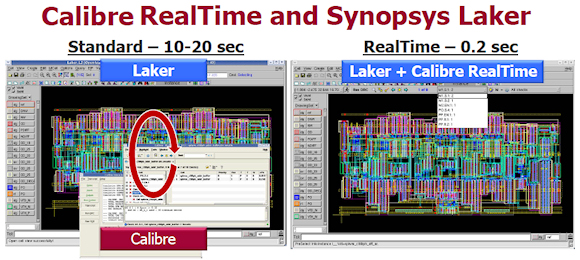 The reason why it speeds up both tools' runtimes by 50X to 100X is because
they're both natively using the same OA db -- there's no need to do those
slow between-tool stream-outs, etc.
This gives Laker users the SAME Calibre deck, same Calibre engine, and the
same results the qualifying fab sees -- except that the Laker users get this
DURING layout creation and editing instead of afterwards.
- Joe Davis
Mentor Graphics Wilsonville, OR
The reason why it speeds up both tools' runtimes by 50X to 100X is because
they're both natively using the same OA db -- there's no need to do those
slow between-tool stream-outs, etc.
This gives Laker users the SAME Calibre deck, same Calibre engine, and the
same results the qualifying fab sees -- except that the Laker users get this
DURING layout creation and editing instead of afterwards.
- Joe Davis
Mentor Graphics Wilsonville, OR
Join
Index
Next->Item
|
|


