( ESNUG 539 Item 4 ) -------------------------------------------- [05/08/14]
Subject: 15 gotchas found in Design and IP data management tools (part I)
From: [ Dean Drako of IC Manage ]
Hi, John,
The items 1 to 4 here below in this (part I) are the "nuts and bolts" of
a DM system.
1. Revision Control
2. Configuration Management
3. Branching
4. Performance
It can be frustrating, because on paper, the claims of various DM tools can
sound quite similar -- as though they are just checklist items.
In reality, there is a wide variation, not only in what is out-of-the-box,
but also, how various DM tools approach to each of these areas.
Later in (part II) I go into detail with items 5 to 15.
- Dean Drako
IC Manage Campbell, CA
---- ---- ---- ---- ---- ---- ----
1. REVISION CONTROL
A fundamental function of any DM system is revision control, which involves
managing files and groups of files.
Design Management/Revision Control tools are typically based on one of three
architectures:
Individual File-based: ClioSoft, Dassault, CVS
Change-based: IC Manage/Perforce, Subversion
Distributed Version Control Systems: GIT, Mercurial
Here's a quick breakdown of these three.
INDIVIDUAL FILE-BASED DM SYSTEMS:
Individual file-based systems originated in the 1975, with SCCS; in 1982 RCS
was introduced.
In an individual file-based DM system, files are checked in one at a time,
rather than assigning a change number to a group of files.
You query individual files to find their most recent version. You must know
the particular files exist to know to be able look for them. This may be an
issue if your file or files were not part of your specific workspace, as you
have no visibility into their creation or modification.
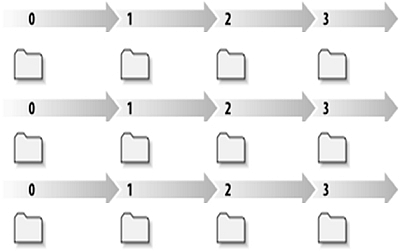 Individual file-based DM: Individual files change over time
Because there is no concept of "tasks" associated with a group of files,
it can be difficult to determine the designer's intent. To back out a
particular task you must spend time trying to reconstruct the file's group
relationship by looking at its comments and file time stamps.
CHANGE-BASED DM SYSTEMS:
The first change-based system, Perforce, was introduced in 1995. Subversion
was introduced in 2000.
A change-based system communicates changes made to any number of files and
directories as a single transaction -- and that transaction is permanently
recorded in the group of files once the transaction is checked-in.
Each time a new transaction occurs, the DM system creates a new state for
the file tree. Each file tree state is always assigned a unique, immutable
number which is one integer greater than the number assigned at the
previous state. This change ordering and grouping is always preserved,
even when there are multiple users submitting concurrently.
Individual file-based DM: Individual files change over time
Because there is no concept of "tasks" associated with a group of files,
it can be difficult to determine the designer's intent. To back out a
particular task you must spend time trying to reconstruct the file's group
relationship by looking at its comments and file time stamps.
CHANGE-BASED DM SYSTEMS:
The first change-based system, Perforce, was introduced in 1995. Subversion
was introduced in 2000.
A change-based system communicates changes made to any number of files and
directories as a single transaction -- and that transaction is permanently
recorded in the group of files once the transaction is checked-in.
Each time a new transaction occurs, the DM system creates a new state for
the file tree. Each file tree state is always assigned a unique, immutable
number which is one integer greater than the number assigned at the
previous state. This change ordering and grouping is always preserved,
even when there are multiple users submitting concurrently.
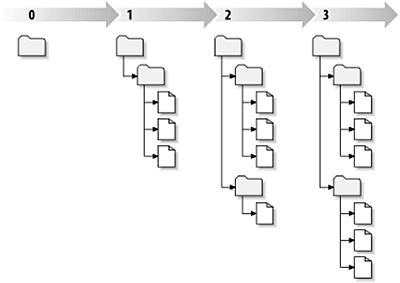 Change-based DM: File-tree changes over time
In the diagram above, you can see that each numbered state is a "snapshot"
in time of the way the file-tree looked after a particular transaction.
Each designer task typically spans across multiple files. Thus a change-
based approach aligns with designer intent, automatically mapping these
tasks -- i.e. the changes associated with a group of files -- to specific
change numbers.
Authorized users can then query the changes globally in the DM system. They
do this by simply requesting a list of all the change numbers, filtered by
target projects or for the entire system.
DISTRIBUTED VERSION CONTROL SYSTEMS (DVCS)
DVCS uses a peer-to-peer approach. Each peer's working copy is a complete
repository. DVCS DM systems synchronize repositories by exchanging sets
of changes, or "patches" from peer-to-peer.
- Once the various peer elements are merged, the relationships
between the copies are lost -- there is no ancestor chain to
trace back through.
- There is no support for exclusive access to files, which is
a key requirement for binary file hardware design objects.
- The security model for many sub projects is broken; each data
set has its own permission scheme. Each DVCS clone can also be
a security problem since all the history is contained in each
clone and can be easily stolen.
While DVCS has a role in software design, because of these problems above,
DVCS systems are in extremely limited use for hardware design -- beyond
individual RTL groups using simple DVCS for a single project.
Because all of the primary hardware DM systems -- IC Manage, Subversion,
Dassault, ClioSoft and CVS -- use either:
Individual-file based,
or
Change-based DM system architectures,
and NOT DVCS, the rest of my talk will focus on those two architectures.
---- ---- ---- ---- ---- ---- ----
2. CONFIGURATION MANAGEMENT
Configuration management lets HW development teams create and access known
"states" or "snapshots" of a set of file versions -- generally for some
handoff or specific diagnostic. Examples are: DRC-clean, block complete,
regression-qualified, layout ready, tapeout.
Configuration management consists of 3 primary elements:
- Release management: create snapshots of data sets.
- Configuration assembly: combine multiple sets of
releases to create a coherent assembly of a component.
- History: access to prior configurations.
RELEASE MANAGEMENT
The two primary methods for creating releases are:
- Tagging, used with individual file-based systems
- Labeling, used with change-based systems
Tagging
In an individual file-based system, HW design team members manually specify
a symbolic name, which is called a "tag" to build releases. Tags identify
different sets of versions of individual files. The DM system then places the
tag name into every file that makes up that entire release, as shown below.
Change-based DM: File-tree changes over time
In the diagram above, you can see that each numbered state is a "snapshot"
in time of the way the file-tree looked after a particular transaction.
Each designer task typically spans across multiple files. Thus a change-
based approach aligns with designer intent, automatically mapping these
tasks -- i.e. the changes associated with a group of files -- to specific
change numbers.
Authorized users can then query the changes globally in the DM system. They
do this by simply requesting a list of all the change numbers, filtered by
target projects or for the entire system.
DISTRIBUTED VERSION CONTROL SYSTEMS (DVCS)
DVCS uses a peer-to-peer approach. Each peer's working copy is a complete
repository. DVCS DM systems synchronize repositories by exchanging sets
of changes, or "patches" from peer-to-peer.
- Once the various peer elements are merged, the relationships
between the copies are lost -- there is no ancestor chain to
trace back through.
- There is no support for exclusive access to files, which is
a key requirement for binary file hardware design objects.
- The security model for many sub projects is broken; each data
set has its own permission scheme. Each DVCS clone can also be
a security problem since all the history is contained in each
clone and can be easily stolen.
While DVCS has a role in software design, because of these problems above,
DVCS systems are in extremely limited use for hardware design -- beyond
individual RTL groups using simple DVCS for a single project.
Because all of the primary hardware DM systems -- IC Manage, Subversion,
Dassault, ClioSoft and CVS -- use either:
Individual-file based,
or
Change-based DM system architectures,
and NOT DVCS, the rest of my talk will focus on those two architectures.
---- ---- ---- ---- ---- ---- ----
2. CONFIGURATION MANAGEMENT
Configuration management lets HW development teams create and access known
"states" or "snapshots" of a set of file versions -- generally for some
handoff or specific diagnostic. Examples are: DRC-clean, block complete,
regression-qualified, layout ready, tapeout.
Configuration management consists of 3 primary elements:
- Release management: create snapshots of data sets.
- Configuration assembly: combine multiple sets of
releases to create a coherent assembly of a component.
- History: access to prior configurations.
RELEASE MANAGEMENT
The two primary methods for creating releases are:
- Tagging, used with individual file-based systems
- Labeling, used with change-based systems
Tagging
In an individual file-based system, HW design team members manually specify
a symbolic name, which is called a "tag" to build releases. Tags identify
different sets of versions of individual files. The DM system then places the
tag name into every file that makes up that entire release, as shown below.
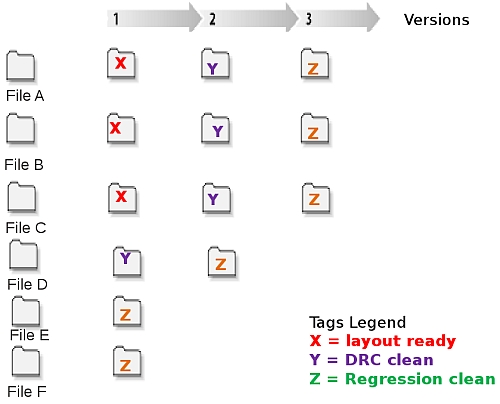 Tags in an Individual File-Based DM system
Notice in the figure above Tag X contains 3 files, Tag Y contains 4 files,
and Tag Z contains 6 files -- all at specific versions. In an individual-
file based system, there is no temporal relationship between these files
since they are all checked in one by one.
Because individual file-based systems have no concept of the global
file-tree state, tagging is an explicit operation -- if you didn't tag
something in your project and you need to go back, you must search manually
for comments and time stamps to try to reconstruct your prior desired file-
tree state.
Tags are not incremental, so data must be continually re-tagged. Because of
this, tag proliferation occurs -- HW development teams end up with lots and
lots of tags -- making file-tree management more complex than it needs to
be. As a result, HW designers tend to reuse tags, resulting in lost prior
release states.
Labeling
With a change-based system, the designer also assigns a symbolic name,
referred to as a "label" to build releases. Since the change numbers for
each file-tree state is already implicit, the DM system only needs to link
the label to the change number, rather than writing a "tag" into every file
in the release. This is depicted below.
Tags in an Individual File-Based DM system
Notice in the figure above Tag X contains 3 files, Tag Y contains 4 files,
and Tag Z contains 6 files -- all at specific versions. In an individual-
file based system, there is no temporal relationship between these files
since they are all checked in one by one.
Because individual file-based systems have no concept of the global
file-tree state, tagging is an explicit operation -- if you didn't tag
something in your project and you need to go back, you must search manually
for comments and time stamps to try to reconstruct your prior desired file-
tree state.
Tags are not incremental, so data must be continually re-tagged. Because of
this, tag proliferation occurs -- HW development teams end up with lots and
lots of tags -- making file-tree management more complex than it needs to
be. As a result, HW designers tend to reuse tags, resulting in lost prior
release states.
Labeling
With a change-based system, the designer also assigns a symbolic name,
referred to as a "label" to build releases. Since the change numbers for
each file-tree state is already implicit, the DM system only needs to link
the label to the change number, rather than writing a "tag" into every file
in the release. This is depicted below.
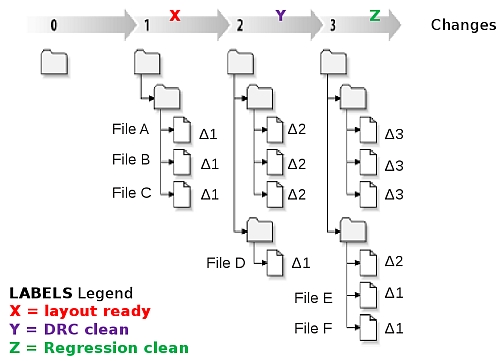 Labels in a Change-Based DM system
Notice in the figure Label X contains 3 files, Label Y contains 4 files, and
Label Z contains 6 files -- all at specific versions. In a change-based
system there's a temporal relationship between the files since Files 1, 2, 3
were created as Change 1; then at Change 2, File 4 was created at the same
time as File 1, 2, 3 were incremented to version 2; and finally at Change 3,
Files 5, 6 were created as the same time as Files 1, 2, 3 were incremented
to version 3 and File 4 was incremented to Version 2.
However, in a change-based system there are two types of labeling activities:
contemporaneous and non-contemporaneous.
Most label activity is contemporaneous -- where you choose all the files
associated with a specific change -- and can therefore simply be aliased
to a change number.
The change number contains all the state information that is required to
capture the moment in time. However, remembering random integers is less
than useful, so "change 47" can be aliased to a symbolic name, such as
"release3.2_drc_clean". This type of label is known as an automatic label.
Only a single metadata record needs to be created and recorded to capture
arbitrarily large releases -- in contrast to file-based tagging that
require a metadata record to be added to each file.
A non-contemporaneous release is one where you wish to choose some, but not
all, files from one or more change numbers. In this case, since a change
number refers to all files in the change, a different approach is required
to automatic labels. (It's similar to a tag, with the major difference being
that the individual files belonging to a particular release are written into
a relational database as a transaction, instead of being written into every
file as is found in RCS based systems.)
In hardware design, contemporaneous changes are the norm, and therefore
automatic labels provide a highly scalable and reliable method for release
creation and management.
Automatic labels can also be applied retroactively, since the change numbers
are implicit and always available.
Also labeling is faster than tagging each individual file, both for the
creation and recovery of file sets. Labels are more reliable because they
involve only a single write.
Finally, labeling uses the global file-tree state. That is, even if you
didn't create labels, you can still retroactively access the change number.
RELEASE ASSEMBLY
Assembly is the process of combining sets of releases or deliverables to
form a cohesive set of relevant design components, such as a PDK, or an IP.
You assemble your design project using building blocks/structures such as
PDKs, EDA Flows, 3rd party IP, verification IP, which can consist of many
data types (RTL, layout...)
Labels in a Change-Based DM system
Notice in the figure Label X contains 3 files, Label Y contains 4 files, and
Label Z contains 6 files -- all at specific versions. In a change-based
system there's a temporal relationship between the files since Files 1, 2, 3
were created as Change 1; then at Change 2, File 4 was created at the same
time as File 1, 2, 3 were incremented to version 2; and finally at Change 3,
Files 5, 6 were created as the same time as Files 1, 2, 3 were incremented
to version 3 and File 4 was incremented to Version 2.
However, in a change-based system there are two types of labeling activities:
contemporaneous and non-contemporaneous.
Most label activity is contemporaneous -- where you choose all the files
associated with a specific change -- and can therefore simply be aliased
to a change number.
The change number contains all the state information that is required to
capture the moment in time. However, remembering random integers is less
than useful, so "change 47" can be aliased to a symbolic name, such as
"release3.2_drc_clean". This type of label is known as an automatic label.
Only a single metadata record needs to be created and recorded to capture
arbitrarily large releases -- in contrast to file-based tagging that
require a metadata record to be added to each file.
A non-contemporaneous release is one where you wish to choose some, but not
all, files from one or more change numbers. In this case, since a change
number refers to all files in the change, a different approach is required
to automatic labels. (It's similar to a tag, with the major difference being
that the individual files belonging to a particular release are written into
a relational database as a transaction, instead of being written into every
file as is found in RCS based systems.)
In hardware design, contemporaneous changes are the norm, and therefore
automatic labels provide a highly scalable and reliable method for release
creation and management.
Automatic labels can also be applied retroactively, since the change numbers
are implicit and always available.
Also labeling is faster than tagging each individual file, both for the
creation and recovery of file sets. Labels are more reliable because they
involve only a single write.
Finally, labeling uses the global file-tree state. That is, even if you
didn't create labels, you can still retroactively access the change number.
RELEASE ASSEMBLY
Assembly is the process of combining sets of releases or deliverables to
form a cohesive set of relevant design components, such as a PDK, or an IP.
You assemble your design project using building blocks/structures such as
PDKs, EDA Flows, 3rd party IP, verification IP, which can consist of many
data types (RTL, layout...)
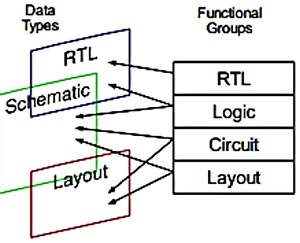 As shown above, design teams need to be able to mix-and-match design data,
for example creating some files that are project-specific while referencing
files from other projects or shared IP.
An example of this is a HW engineer assembling IPs, with his or her own
logic at the SoC level. This engineer, or even his/her project manager,
can later then automatically hand off new component releases using only
the relevant added files to any other engineer -- the moment they become
available without the hassle of emails, phone calls, or meetings.
HISTORY ACCESS
Another critical aspect of where DM system configuration management varies
is in their ability (or inability) to recall a specific previous release of
a set of files.
For example, when a designer needs to reproduce a particular release state
to be sure he was fixing the right bug -- he needs to be able to recall the
entire release state at a specific point in time.
This is where the two major DM systems greatly differ:
- With an individual file-based DM system, if tagging is done really
well, accessing prior-state configurations is manageable, as the
DM system can be searched by tags. If the tagging has any flaws,
the designer must potentially search every file.
However, even with perfect tagging, it can be difficult to find
the state of an untagged file at the time the tag was created.
This is because although tags can define the state of the design
at a point in time, the tags themselves can -- intentionally or
unintentionally-- change over time. For example, the tags can be
overwritten or deleted, so the engineer may not be able to
recover the same data state.
- In contrast, change-based systems automatically reference all files
under revision control at any point in time. The result is that
designers can search back in time to find an unchanged working or
non-working version. With a changed-based DM system, you specify
a previous state and the DM system will automatically retrieve the
exact state for any or all files in the design at that time.
A change-based DM system maintains the design snapshot or release
at any point in time. Since this type of system can reproduce the
exact state of the design files simply by referring to this state,
they are immutable and thus highly predictable.
This ability to access prior configurations at any given point in time is
especially important because it is impossible for HW designers to predict,
in advance, all the possible release states they will need to trace back
to months later.
---- ---- ---- ---- ---- ---- ----
3. BRANCHING
Branching lets HW engineers try experimental parallel developments on their
designs to see if a better design (or bug fix) is possble. Branching along
with merging/replacement serves as the foundation for Dependency Management.
The five key branching capabilities to assess are: Branching architecture;
History Tracing; Storage Impact; Visibility; and Collaboration.
There are 2 primary branching architectures:
VERSION-TREE BRANCHING
Version-tree branching is "version-to-version" branching. When branches are
created from the parent file revisions, the branched copies are each given
names associated with the successive versions and branches. As more
branches are created, the namespace becomes more and more complex.
1.2.6.4.1.3
Version Tree Branching: a 3rd generation branch name
An example of this complexity for a 3rd generation branch is "1.2.6.4.1.3".
The "1.2" is the trunk of the data tree. The "6.4" is the specific rev of
trunk "1.2". The "1.3" is the branch rev of trunk "1.2", rev "6.4".
For each successive branch, generation of the branch rev numbers gets longer
and longer -- and remembering the significance of these numbers can become
daunting for designers.
As a result they often avoid branching. It's easier for engineers to make
UNIX copies with their own naming styles. This creates serious problems
in their project because if they copy a file-tree they also copy its bugs,
and if a bug is fixed after you-ve copied the file-tree, you miss that vital
information. (More details on this in bug dependency management).
INTER-FILE BRANCHING
Inter-file branching is "file-to-file" branching. That is, inter-file
branching creates a new file for each branch -- automatically recording the
relationship in both the parent and the child.
As shown above, design teams need to be able to mix-and-match design data,
for example creating some files that are project-specific while referencing
files from other projects or shared IP.
An example of this is a HW engineer assembling IPs, with his or her own
logic at the SoC level. This engineer, or even his/her project manager,
can later then automatically hand off new component releases using only
the relevant added files to any other engineer -- the moment they become
available without the hassle of emails, phone calls, or meetings.
HISTORY ACCESS
Another critical aspect of where DM system configuration management varies
is in their ability (or inability) to recall a specific previous release of
a set of files.
For example, when a designer needs to reproduce a particular release state
to be sure he was fixing the right bug -- he needs to be able to recall the
entire release state at a specific point in time.
This is where the two major DM systems greatly differ:
- With an individual file-based DM system, if tagging is done really
well, accessing prior-state configurations is manageable, as the
DM system can be searched by tags. If the tagging has any flaws,
the designer must potentially search every file.
However, even with perfect tagging, it can be difficult to find
the state of an untagged file at the time the tag was created.
This is because although tags can define the state of the design
at a point in time, the tags themselves can -- intentionally or
unintentionally-- change over time. For example, the tags can be
overwritten or deleted, so the engineer may not be able to
recover the same data state.
- In contrast, change-based systems automatically reference all files
under revision control at any point in time. The result is that
designers can search back in time to find an unchanged working or
non-working version. With a changed-based DM system, you specify
a previous state and the DM system will automatically retrieve the
exact state for any or all files in the design at that time.
A change-based DM system maintains the design snapshot or release
at any point in time. Since this type of system can reproduce the
exact state of the design files simply by referring to this state,
they are immutable and thus highly predictable.
This ability to access prior configurations at any given point in time is
especially important because it is impossible for HW designers to predict,
in advance, all the possible release states they will need to trace back
to months later.
---- ---- ---- ---- ---- ---- ----
3. BRANCHING
Branching lets HW engineers try experimental parallel developments on their
designs to see if a better design (or bug fix) is possble. Branching along
with merging/replacement serves as the foundation for Dependency Management.
The five key branching capabilities to assess are: Branching architecture;
History Tracing; Storage Impact; Visibility; and Collaboration.
There are 2 primary branching architectures:
VERSION-TREE BRANCHING
Version-tree branching is "version-to-version" branching. When branches are
created from the parent file revisions, the branched copies are each given
names associated with the successive versions and branches. As more
branches are created, the namespace becomes more and more complex.
1.2.6.4.1.3
Version Tree Branching: a 3rd generation branch name
An example of this complexity for a 3rd generation branch is "1.2.6.4.1.3".
The "1.2" is the trunk of the data tree. The "6.4" is the specific rev of
trunk "1.2". The "1.3" is the branch rev of trunk "1.2", rev "6.4".
For each successive branch, generation of the branch rev numbers gets longer
and longer -- and remembering the significance of these numbers can become
daunting for designers.
As a result they often avoid branching. It's easier for engineers to make
UNIX copies with their own naming styles. This creates serious problems
in their project because if they copy a file-tree they also copy its bugs,
and if a bug is fixed after you-ve copied the file-tree, you miss that vital
information. (More details on this in bug dependency management).
INTER-FILE BRANCHING
Inter-file branching is "file-to-file" branching. That is, inter-file
branching creates a new file for each branch -- automatically recording the
relationship in both the parent and the child.
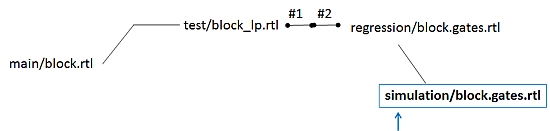 Inter-file branching: 3rd generation branch name
As a result, there is no forced complex version namespace as there is with
revision-tree branching. A 3rd generation branch has an intuitive name, yet
retains relationship to the parent -- such as "simulation/block.gates.rtl"
shown above -- which is unlike "1.2.6.4.1.3").
HISTORY TRACING
Some inter-file branching DM systems can also maintain the bi-directional
integration history between parent and child. This lets the engineers do
quick historical tracing of all files that have been branched, as well as
their final destinations. For example:
>log main/block.rtl
#1 added by msmith 2:15 1/7/13
#2 edited by rjones 18:21 1/12/13
#3 edited by jmayer 10:27 1/14/13
... branched into test/block_lp.rtl#1
#4 edited by jmayer 19:21 1/17/13
In the above example, a file in main/block.rtl is created, edited twice and
then branched into a new file called "test/block_lp.rtl".
The file log command allows us to visualize the source history and any new
destinations that may have been created from that file, at any point along
it's version history.
Some systems support bi-directional integration history, where the file log
of a new destination also records the parent information, allowing for easy
reverse tracing.
>log test/block_lp.rtl
#1 branched by tjen 11:15 1/15/13
... branched from main/block.rtl#3
Here the file log information clearly shows us the source of version 1,
namely main/block.rtl version 3. This kind of information is not available
in a version-tree branching system, where the source object must be decoded
through version numbering or in change-based systems that do not record
bi-directional integration information.
Maintaining this bi-directional information is very useful when successive
edits take place to the source. From original main/block.rtl example, we
can see that a "version 4" exists on the source -- but it has not yet been
propagated to the child.
This propagation is easily done in a DM system that records bi-directional
integration history since no diffs are needed to understand that a new
version of the source exists.
Two kinds of propagations can occur: a copy (for binary objects) or a merge
(for ASCII objects).
>log main/block.rtl
#1 added by msmith 2:15 1/7/13
#2 edited by rjones 18:21 1/12/13
#3 edited by jmayer 10:27 1/14/13
... branched into test/block_lp.rtl#1
#4 edited by jmayer 19:21 1/17/13
... merge into test/block_lp.rtl#2
We see a new entry for version 4, that clearly identifies that the child
object has been updated!
The same information is also available bi-directionally.
>log test/block_lp.rtl
#1 branched by tjen 11:15 1/15/13
... branched from main/block.rtl#3
#2 integrate by tjen 20:18 1/17/13
... merge from main/block.rtl#4
Integration history can also be used as an audit trail for reporting, so
that HW designers can intuitively trace the evolution of a file across
successive generations of branches. Traditional branching creates
physical copies that use storage in the repository, but inter-file
branching allows delta storage... i.e. space is only consumed when a
branched object is changed or a new object is created in the branch.
That is, you can create millions of branches with almost zero storage
overhead. This feature is very useful to record deliveries to projects,
customers, foundries, etc. without any storage impact.
STORAGE IMPACT
Revision-tree branching can consume a lot of storage due to the number of
physical file copies required. In contrast, inter-file branching creates
"virtual copies" where the newly branched fiel uses the contents of the
original file; this its space requirement is merely a small record which
points to the original file. When a branch is extended by adding a new
revision, the branched file then consumes storage for the first time.
VISIBILITY
Change-based systems allow for easy visibility of how change occurs in the
project as a whole. This applies to both committed changes as well as
works in progress.
In non-transactional systems, change information is usually communicated
to other engineers by an external system that sends email -- which often
leads to a deluge of spam.
In a change-based system, the "changes" command can identify what has
occured in the system and -- assuming you have the appropriate security
clearance -- the global history is easy to access
> changes last 7
Change 29200 on 2014/05/05 by roger@abc 'Wrong attributes'
Change 29199 on 2014/05/05 by peter@xyz 'Implement tabVis'
Change 29198 on 2014/05/05 by alexey@moo 'icmjpi: requires'
Change 29197 on 2014/05/05 by roger@abc 'Merge peer fixes'
Change 29196 on 2014/05/05 by peter@xyz 'Changes to suppo'
Change 29195 on 2014/05/05 by gary@cow 'Missing syncs'
Change 29194 on 2014/05/02 by peter@abc 'Fixed errro-198'
Each change may be "described" to get further conext, in either short form
(metadata only) or long form (with deltas)
> describe short 29197
Change 29197 by roger@abc on 2014/05/05 16:17:19
Merge in peering fixes.
Affected files ...
... //Pepsi/5.0/.cproject#38 edit
... //Pepsi/5.0/ChangeLog#41 edit
... //Pepsi/5.0/configure.ac#24 edit
... //Pepsi/5.0/src/peer/cMessage.C#5 edit
... //Pepsi/5.0/src/peer/cMessage.H#6 edit
... //Pepsi/5.0/src/peer/cSession.C#13 edit
... //Pepsi/5.0/src/peer/cTcpChannel.C#9 edit
... //Pepsi/5.0/test/peer/reclaim/Proto.H#2 edit
Removing the "short" keyword will add delta change information (shown here
for one file in the set for brevity)
==== //Pepsi/5.0/.cproject#38 (text+w) ====
1309c1309
<
---
> targetID="org.eclipse.cdt.build.MakeTargetBuilder">
1311,1312c1311
<
< libPepsi-rev.la
For files that are works in progress, DM systems that support server-side
metadata are able to report information about uncommitted transactions
very easily since they just ask the server. In contrast, systems that
only support client-side metadata (think .RCS, or .CVS directories
smattered around your workspace) take signficant effort and plumbing to
get reporting information on what other people are working on.
> opened -all //Pepsi/...
//Pepsi/4.2-nick/dev-Pepsis/test/peer/EchoClient.C#3
- edit default change (ktext) by nick@xyz
//Pepsi/4.2/.project#35
- edit default change (text+w) by roger@abc
//Pepsi/4.2/.settings/org.eclipse.cdt.managedbuilder.core.prefs#10
- edit default change (text+w) by roger@abc
//Pepsi/4.2/po/es.po#54
- edit default change (text+w) by roger@abc
//Pepsi/4.2/po/fr.po#42
- edit default change (text+w) by roger@abc
The "opened -all" limits the scope to just report on all work in progress
files under //Pepsi. We can clearly see what Nick and Roger are up to
with a simple and fast query to the server, rather than having to walk
every workspace to retrieve the information.
COLLABORATION
Another characteristic of some configuration management systems is the
ability to enforce a consistent hierarchy for the design structure which
provides a common convention for communication and collaboration between
projects and teams.
DM systems vary in how quickly the initial configuration and subsequent
configurations can be set up -- it can take an hour with one system, or
hours-to-days with another one.
Along these same lines, it's important to also assess traceability.
For any given design element, is the link between the parent and child
(branch or design derivative) preserved? Is it possible to allow bi-
directional propagation of information and changes?
Typically a change-based system with inter-file branching can do this, but
it's much harder -- or even impossible -- in a system where physical copies
are made of each derivative design or design element. This is because
valuable source and destination relationships are not maintained.
---- ---- ---- ---- ---- ---- ----
4. MULTI-SITE PERFORMANCE
HW designers like their workspace to populate quickly. That is, if it takes
their DM system 3 hours just to get their AMS design loaded before they can
start working on it in Virtuoso, the engineers will come up with a some way
around using that DM system.
The same is true for DM check-in and check-out times.
Be aware that some DM systems are 10X faster than others. While this is an
area that can be easily benchmarked, it is important to test not only design
sizes, but also designs with a large number of files.
The major transport protocols in order of increasing transport speed are:
HTTP (1X)
TCP/IP (1.5X)
Streaming TCP (10X)
Streaming TCP is an optimization of TCP/IP which uses a special message
queuing architecture with custom remote procedure calls. Bandwidth
utilization goes from 10% of network capacity for HTTP to greater than
70% for streaming TCP.
Streaming TCP is typically 5-10X faster than HTTP for a large number of
files because of the greater number of handshakes involved with HTTP. This
HTTP slowdown is further exacerbated when there is a remote site involved
with a high latency connection.
Depending on the size of your file set, the difference in performance can be
between seconds and minutes, or even hours versus days. For remote sites,
the goal is to avoid WAN performance bottlenecks.
Both local and remote DM performance is something you should benchmark;
however, be sure to evaluate performance at scale, and with a large number
of files, not just a few workspaces with a handful of users.
---- ---- ---- ---- ---- ---- ----
I will continue this discussion in (part II) with items 5 to 15 on the
following page, starting with "Bug Dependency Management."
- Dean Drako
IC Manage Campbell, CA
---- ---- ---- ---- ---- ---- ----
Related Articles
SCOOP! - Dean Drako's design and IP management survey Infographic
Nitty-gritty details to that design and IP survey Infographic
What design and verification engineers want on global projects
15 gotchas found in Design and IP data management tools (part I)
15 gotchas found in Design and IP data management tools (part II)
Dean Drako on IC Manage, Subversion, DesignSync, ClioSoft, CVS
Inter-file branching: 3rd generation branch name
As a result, there is no forced complex version namespace as there is with
revision-tree branching. A 3rd generation branch has an intuitive name, yet
retains relationship to the parent -- such as "simulation/block.gates.rtl"
shown above -- which is unlike "1.2.6.4.1.3").
HISTORY TRACING
Some inter-file branching DM systems can also maintain the bi-directional
integration history between parent and child. This lets the engineers do
quick historical tracing of all files that have been branched, as well as
their final destinations. For example:
>log main/block.rtl
#1 added by msmith 2:15 1/7/13
#2 edited by rjones 18:21 1/12/13
#3 edited by jmayer 10:27 1/14/13
... branched into test/block_lp.rtl#1
#4 edited by jmayer 19:21 1/17/13
In the above example, a file in main/block.rtl is created, edited twice and
then branched into a new file called "test/block_lp.rtl".
The file log command allows us to visualize the source history and any new
destinations that may have been created from that file, at any point along
it's version history.
Some systems support bi-directional integration history, where the file log
of a new destination also records the parent information, allowing for easy
reverse tracing.
>log test/block_lp.rtl
#1 branched by tjen 11:15 1/15/13
... branched from main/block.rtl#3
Here the file log information clearly shows us the source of version 1,
namely main/block.rtl version 3. This kind of information is not available
in a version-tree branching system, where the source object must be decoded
through version numbering or in change-based systems that do not record
bi-directional integration information.
Maintaining this bi-directional information is very useful when successive
edits take place to the source. From original main/block.rtl example, we
can see that a "version 4" exists on the source -- but it has not yet been
propagated to the child.
This propagation is easily done in a DM system that records bi-directional
integration history since no diffs are needed to understand that a new
version of the source exists.
Two kinds of propagations can occur: a copy (for binary objects) or a merge
(for ASCII objects).
>log main/block.rtl
#1 added by msmith 2:15 1/7/13
#2 edited by rjones 18:21 1/12/13
#3 edited by jmayer 10:27 1/14/13
... branched into test/block_lp.rtl#1
#4 edited by jmayer 19:21 1/17/13
... merge into test/block_lp.rtl#2
We see a new entry for version 4, that clearly identifies that the child
object has been updated!
The same information is also available bi-directionally.
>log test/block_lp.rtl
#1 branched by tjen 11:15 1/15/13
... branched from main/block.rtl#3
#2 integrate by tjen 20:18 1/17/13
... merge from main/block.rtl#4
Integration history can also be used as an audit trail for reporting, so
that HW designers can intuitively trace the evolution of a file across
successive generations of branches. Traditional branching creates
physical copies that use storage in the repository, but inter-file
branching allows delta storage... i.e. space is only consumed when a
branched object is changed or a new object is created in the branch.
That is, you can create millions of branches with almost zero storage
overhead. This feature is very useful to record deliveries to projects,
customers, foundries, etc. without any storage impact.
STORAGE IMPACT
Revision-tree branching can consume a lot of storage due to the number of
physical file copies required. In contrast, inter-file branching creates
"virtual copies" where the newly branched fiel uses the contents of the
original file; this its space requirement is merely a small record which
points to the original file. When a branch is extended by adding a new
revision, the branched file then consumes storage for the first time.
VISIBILITY
Change-based systems allow for easy visibility of how change occurs in the
project as a whole. This applies to both committed changes as well as
works in progress.
In non-transactional systems, change information is usually communicated
to other engineers by an external system that sends email -- which often
leads to a deluge of spam.
In a change-based system, the "changes" command can identify what has
occured in the system and -- assuming you have the appropriate security
clearance -- the global history is easy to access
> changes last 7
Change 29200 on 2014/05/05 by roger@abc 'Wrong attributes'
Change 29199 on 2014/05/05 by peter@xyz 'Implement tabVis'
Change 29198 on 2014/05/05 by alexey@moo 'icmjpi: requires'
Change 29197 on 2014/05/05 by roger@abc 'Merge peer fixes'
Change 29196 on 2014/05/05 by peter@xyz 'Changes to suppo'
Change 29195 on 2014/05/05 by gary@cow 'Missing syncs'
Change 29194 on 2014/05/02 by peter@abc 'Fixed errro-198'
Each change may be "described" to get further conext, in either short form
(metadata only) or long form (with deltas)
> describe short 29197
Change 29197 by roger@abc on 2014/05/05 16:17:19
Merge in peering fixes.
Affected files ...
... //Pepsi/5.0/.cproject#38 edit
... //Pepsi/5.0/ChangeLog#41 edit
... //Pepsi/5.0/configure.ac#24 edit
... //Pepsi/5.0/src/peer/cMessage.C#5 edit
... //Pepsi/5.0/src/peer/cMessage.H#6 edit
... //Pepsi/5.0/src/peer/cSession.C#13 edit
... //Pepsi/5.0/src/peer/cTcpChannel.C#9 edit
... //Pepsi/5.0/test/peer/reclaim/Proto.H#2 edit
Removing the "short" keyword will add delta change information (shown here
for one file in the set for brevity)
==== //Pepsi/5.0/.cproject#38 (text+w) ====
1309c1309
<
---
> targetID="org.eclipse.cdt.build.MakeTargetBuilder">
1311,1312c1311
<
< libPepsi-rev.la
For files that are works in progress, DM systems that support server-side
metadata are able to report information about uncommitted transactions
very easily since they just ask the server. In contrast, systems that
only support client-side metadata (think .RCS, or .CVS directories
smattered around your workspace) take signficant effort and plumbing to
get reporting information on what other people are working on.
> opened -all //Pepsi/...
//Pepsi/4.2-nick/dev-Pepsis/test/peer/EchoClient.C#3
- edit default change (ktext) by nick@xyz
//Pepsi/4.2/.project#35
- edit default change (text+w) by roger@abc
//Pepsi/4.2/.settings/org.eclipse.cdt.managedbuilder.core.prefs#10
- edit default change (text+w) by roger@abc
//Pepsi/4.2/po/es.po#54
- edit default change (text+w) by roger@abc
//Pepsi/4.2/po/fr.po#42
- edit default change (text+w) by roger@abc
The "opened -all" limits the scope to just report on all work in progress
files under //Pepsi. We can clearly see what Nick and Roger are up to
with a simple and fast query to the server, rather than having to walk
every workspace to retrieve the information.
COLLABORATION
Another characteristic of some configuration management systems is the
ability to enforce a consistent hierarchy for the design structure which
provides a common convention for communication and collaboration between
projects and teams.
DM systems vary in how quickly the initial configuration and subsequent
configurations can be set up -- it can take an hour with one system, or
hours-to-days with another one.
Along these same lines, it's important to also assess traceability.
For any given design element, is the link between the parent and child
(branch or design derivative) preserved? Is it possible to allow bi-
directional propagation of information and changes?
Typically a change-based system with inter-file branching can do this, but
it's much harder -- or even impossible -- in a system where physical copies
are made of each derivative design or design element. This is because
valuable source and destination relationships are not maintained.
---- ---- ---- ---- ---- ---- ----
4. MULTI-SITE PERFORMANCE
HW designers like their workspace to populate quickly. That is, if it takes
their DM system 3 hours just to get their AMS design loaded before they can
start working on it in Virtuoso, the engineers will come up with a some way
around using that DM system.
The same is true for DM check-in and check-out times.
Be aware that some DM systems are 10X faster than others. While this is an
area that can be easily benchmarked, it is important to test not only design
sizes, but also designs with a large number of files.
The major transport protocols in order of increasing transport speed are:
HTTP (1X)
TCP/IP (1.5X)
Streaming TCP (10X)
Streaming TCP is an optimization of TCP/IP which uses a special message
queuing architecture with custom remote procedure calls. Bandwidth
utilization goes from 10% of network capacity for HTTP to greater than
70% for streaming TCP.
Streaming TCP is typically 5-10X faster than HTTP for a large number of
files because of the greater number of handshakes involved with HTTP. This
HTTP slowdown is further exacerbated when there is a remote site involved
with a high latency connection.
Depending on the size of your file set, the difference in performance can be
between seconds and minutes, or even hours versus days. For remote sites,
the goal is to avoid WAN performance bottlenecks.
Both local and remote DM performance is something you should benchmark;
however, be sure to evaluate performance at scale, and with a large number
of files, not just a few workspaces with a handful of users.
---- ---- ---- ---- ---- ---- ----
I will continue this discussion in (part II) with items 5 to 15 on the
following page, starting with "Bug Dependency Management."
- Dean Drako
IC Manage Campbell, CA
---- ---- ---- ---- ---- ---- ----
Related Articles
SCOOP! - Dean Drako's design and IP management survey Infographic
Nitty-gritty details to that design and IP survey Infographic
What design and verification engineers want on global projects
15 gotchas found in Design and IP data management tools (part I)
15 gotchas found in Design and IP data management tools (part II)
Dean Drako on IC Manage, Subversion, DesignSync, ClioSoft, CVS
Join
Index
Next->Item
|
|