( ESNUG 571 Item 1 ) -------------------------------------------- [04/11/17]

Subject: Dan Clein's status of Virtuoso, Custom Compiler, and Pulsic tools
First off, although 16nm, 10nm, and 7nm are hot news for digital designs,
most AMS work is done at 65nm or 45nm. So when I saw TSMC promoting that
"Cadence and TSMC also validated a custom/mixed-signal
design
reference flow for the 10nm process."
- Cadence press release (03/15/2016)
It was Tom Beckley aiming at getting (or more likely keeping) his Virtuoso
business with either Apple, Qualcomm, or Samsung smart phones. Otherwise
the vast bulk of AMS chip design is not done anywhere near 10nm.
Secondly, I think it's important to discuss both big-A/little-d and the more
common little-A/big-D designs being done today.
- Marmaduke's AMS circuit designer's DAC'16 Trip Report
From: [ Dan Clein of Sankalp ]

Hi, John,

I really liked Marmaduke's AMS circuit designer's DAC Trip Report.  I've not
seen anything with this level of AMS detail on the web anywhere.  Please tell
him that "Dan Clein says 'Good Job!'" from me, OK?

Since that DAC was 10 months ago, I thought I'd share my State of the Union
on what's going on with full custom layout EDA tools now.

         ----    ----    ----    ----    ----    ----    ----
MENTOR & PYXIS ARE WEAK IN CUSTOM

Right now, Mentor does not have anything below 28nm (FinFET country) for
full custom layout.  Wally purchased Pyxis a few years ago, with the
intention to be OA ready, but the results are not very encouraging...

    - Mentor Pyxis (router)

       - helped develop an OA platform inside Mentor
       - has iPDK's for TSMC, Tower, GF... but only down to 28 nm
       - the Pyxis router is good  - as it is the original engine

    - IC Station (placer)

       - older technology.  Not originally an OA tool.
       - it's a device placer with only limited capabilities; not
         really powerful like the schematic option.
       - IC Station is not 100% OA compatible, but still has
         the Correct By Construction mode available
       - the Pycell device generator is working now, but as
         a cell/MAP ROD AMPLE code

    - Tanner Tools

       - low cost option that shines in MEMS applications

Mentor is still trying to figure out how to use Tanner tools better, but
them integrating it into their old IC Station is not very likely.  The
only shiny star for Mentor is their Calibre family tools.  From physical
verification to parasitic extraction, Calibre is still the leader all the
way down to 5nm...  (See ESNUG 554 #3 where Imec used Calibre at 5nm.)
But Mentor may be moving fast forward soon in full custom tools.  They've
hired John Stabenow, former director of Virtuoso marketing at Cadence.

Yes, for chips above 28nm Mentor Pyxis/IC Station/Tanner is supported by all
the fabs -- but even then these tools only have very small footprint in the
full custom layout environment market.  And since Mentor did not roadmap
anything for FinFET at DAC, the chances are quite high that it's few
remaining customers will move away to rival environments.

I am sorry to see them falling behind as I have used Mentor's full custom
layout tools for 20+ years.

         ----    ----    ----    ----    ----    ----    ----

PULSIC UNITY HAS MASSIVE ROUTING CAPACITY

In the full custom world, the new kid on the block for the past 10 years has
been Pulsic.  It's a full suite, called Unity, for full custom digital or
mixed signal from the device-level to cell-level routing and chip finishing.
Unity's strength is its incredible capacity.  Since Virtuoso VCP's limit is
at around 5,000 placeable units, anything beyond 5,000 historically has had
to go to a digital PnR flow like Innovus/ICC/ICC2/Nitro-SoC -- instead of
schematic-driven flows.

Unity expands full custom routing up to 1,000,000 placeable components.

The Unity environment allows a lot of customization -- so if you need small
and precise, or a controlled clock distribution, or special routing
constraints -- then this is the suite you look at.

         ----    ----    ----    ----    ----    ----    ----

PULSIC ANIMATE KICKS ASS!

Let's come back to the Analog World where Pulsic amazed me with a tool
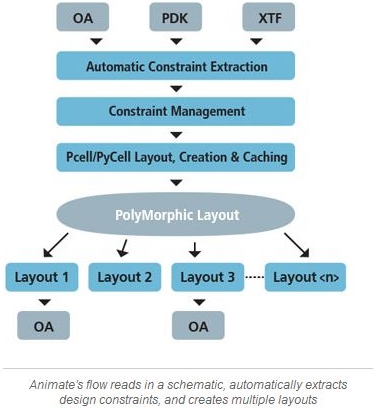
called Animate.  You feed it a schematic, with or without constraints,
and in minutes Animate cranks out 100's of solutions that are all LVS
clean and 80-90% DRC clean.
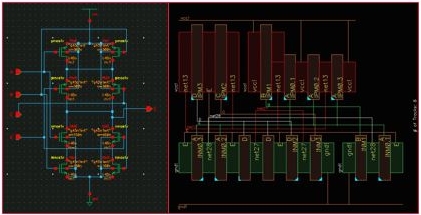
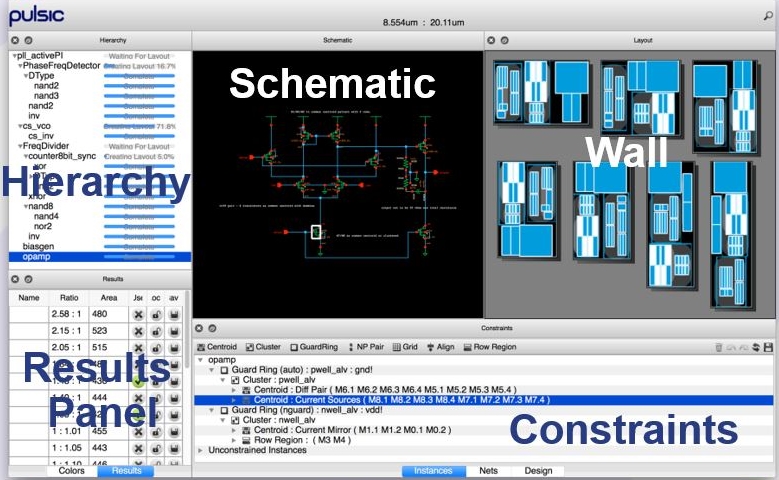
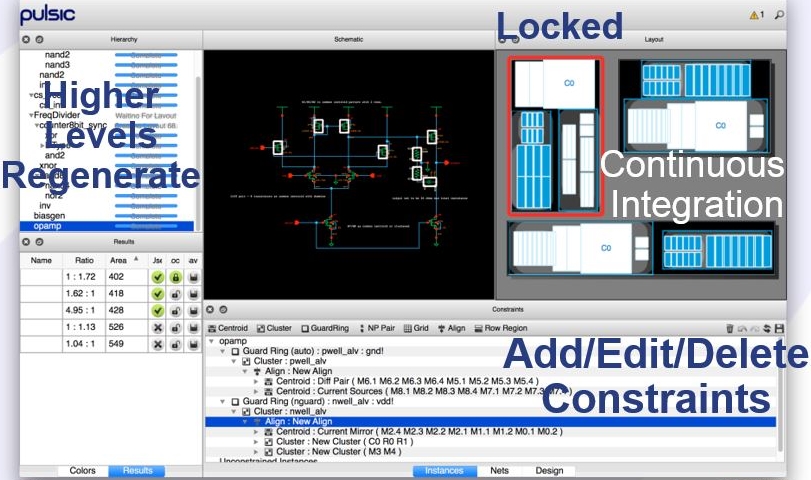
Above is the conceptual Animate flow.  Here's what Animate looks like to
the circuit designer.
 (click to enlarge pic)
|
It works by basically fast tracking your initial SPICE simulation into 100's
of backannotated-from-layout SPICE simulations.  For complex circuits with
a multitude of options to evaluate, Animate shines.
 (click to enlarge pic)
|
You can then take any of the 100+ layout options and develop it further by
adding constraints once your first layout is generated.  (It's like the old
Cadabra Kazam on steroids, that Synopsys later bought and killed.)

With Animate, you can keep and compare all the layout variants Animate
generates and chose the one most accurate for your needs.  From symmetric
to centroid layout, from simple to triple guard rings, adding dummies for
process variation, or to constrain routing layers -- using Animate to do
"architecture exploration" is a dream for any user.

PULSIC ANIMATE NOW DOES HIERARCHICAL

Last year Pulsic R&D went up a level.  Now you can take complex blocks and
in minutes Animate makes 100's solutions at all levels of hierarchy.  So
now you can do architecture exploration at PLL or ADC level, and not only
at cell level.

It has a high level abstract view called "Blueprint Views" that provides a
fast yet (mostly) accurate area estimation, and then onto a complete layout
that's "simulation ready".  So based on the available area and constraints
the user can go very fast from initial design to "close to final version"
in days instead of weeks.

Animate is 100% VXL compatible so importing into Virtuoso is instantaneous,
which is good because all of your post-Animate ECOs are done there.

... BUT ANIMATE NEEDS FAB SUPPORT

Right now Animate only works on nodes at 28nm or above.  I would have liked
at DAC'16 to have seen that Animate was ready for FinFET (28nm and below),
but apparently there is a political problem of getting the fabs and the big
customers to share the process data needed to make Animate PDKs below 28nm.

         ----    ----    ----    ----    ----    ----    ----

CADENCE FINALLY LISTENED ABOVE 28NM

For 28nm and above, I'm happy to report that Cadence has started to listen
to customer complaints.  A lot of positive things have happened with:

    - resolving Virtuoso speed issues with redrawing (rendering)
    - Virtuoso read and write GDSII
    - transparent cells for half-cell build-up

and they made their DRD now fast and powerful even at FinFet level in 7nm.
Cadence also "learned" from Synopsys Laker the idea of symbolic placement.
Virtuoso always had cell abstracts for std cell layout; but only for the
digitial PnR world.  Now Beckley's R&D has developed a new tool called
SPD (Symbolic Placement Devices) that does fast row-based placement on up
to 200 devices.  It's nice of them to offer Cadence users this VCP "look
alike" engine, but compared to Animate, SPD is a small child with the
potential to grow big.
 (click to enlarge pic)
|
The other big change for Virtuoso above 28nm is that MODGEN is now actually
"user friendly".  (It hasn't always been that way!)  CDNS finally agreed to
develop what the users always wanted -- a Grid Pattern Editor GPE.  Now the
user has a GUI to play with.  MODGEN GPE provides abstract-level pattern
buildup structures and recognition.  It can copy and reuse patterns from
previous designs.  (GPE is similar to a platform developed earlier by
Synopsys/Laker/Ciranova that's now in a new form in SNPS Custom Compiler.)

Now in both above/below 28nm, MODGEN has matching placement perspectives.
It allows routing trunks and local automation with copy symmetry, etc.
Everyone was asking for these feature because they're specifically good for
capacitors and resistors banks.

         ----    ----    ----    ----    ----    ----    ----

SYNOPSYS IS A "ME, TOO" TOOL IN FULL CUSTOM

Synopsys had an interesting development.  A few years ago they bought almost
all what was available in the analog full custom world: Ciranova, with their
famous Helix placer and their PYCELL knowledge; Magma, in which they got
Barcelona with their analog optimization engines, AVP placer, Compaction
engine, a schematic driven analog and digital router; and all the Springsoft
Laker knowledge.
What came out is a "far cry" of what went in.  The SNPS Custom Designer is
a solid platform that can help a digital flow team enter the analog full
custom world when all they have to do is tweak some small bits in full
custom.  But Custom Designer is not enough to convince even a new user to
buy it.  Custom Designer is frozen in pre-FinFET.  Instead all the SNPS R&D
effort is put into their newer Custom Compiler in the FinFET world (to try
to beat Cadence Virtuoso.)

SNPS CUSTOM COMPILER

Most of the new Custom Compiler technology comes from Springsoft Laker 4
ideas like: abstract placement for architecture exploration; routing on
fix metal tracks; and constraint driven placement and routing.  Here is
what I could gather in terms of novelty in FinFet world.

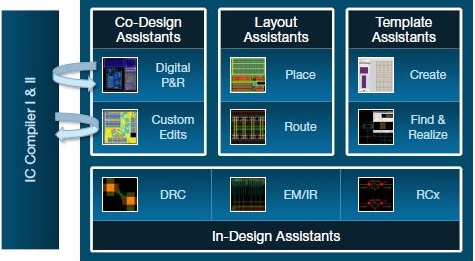
  Custom Compiler, Schematic Driven Layout (SDL) in Synopsys world

    - Template creation assistant - from Laker
        - It identifies potential groupings and templates on its own
        - Allows modification on the fly - Laker symbolic editor
        - Has routing in the template cell view (actually an old
          hierarchical PCELL idea)

    - Graphical Placer with Templates - from Helix and Cadabra
        - If any template is changed, it can ECO all cells in the
          hierarchy with it.  (Great feature!)
        - Does multiple variants for same circuit (from Helix, but
          Pulsic does the same)
        - Does successive refinement (from Laker and Cadabra.)

    - High altitude Routing - from COSMOS
        - Parallel line, buses, trunk, follow-the-cursor interactive
          routing with automatic pin tapping and welding, automatic
          net cloning. (I like this!  It's useful for FinFETs.)

    - Custom Compiler In-Design Analysis - from SNPS R&D
        - Electromigration analysis and constraint checking can be
          done with either Custom Compiler's built-in engine or in
          its integrated CustomSim-RA for signoff analysis.
          Currents for EM analysis are forward-annotated from SPICE
          simulation.
        - Resistance and capacitance extraction can be performed on
          partial layout and do not require an extracted view.  (I
          like this!)  Point-to-point resistance can be measured
          directly on the canvas.  Capacitance reports are generated
          by Star-RC working in an incremental mode also working
          directly from the layout canvas.

So if you are in FinFet and use Synopsys ICC/ICC2 digital flow (some call
it ASIC flow), their Custom Compiler is good enough for anything you need
to do.  From placement to verification everything all is signed off by the
foundries -- so you are safe, but you won't be exited by the tool.  :)

         ----    ----    ----    ----    ----    ----    ----

VIRTUOSO EAD WORKS NOW! USE IT!

If you want to be excited about something new, I'm a big fan of of the "new"
Virtuoso Electrically Aware Design (EAD).   Yes, it was launched a few years
back, but this is the time it finally works the way I wanted!  So what in
now in EAD now that it's working?
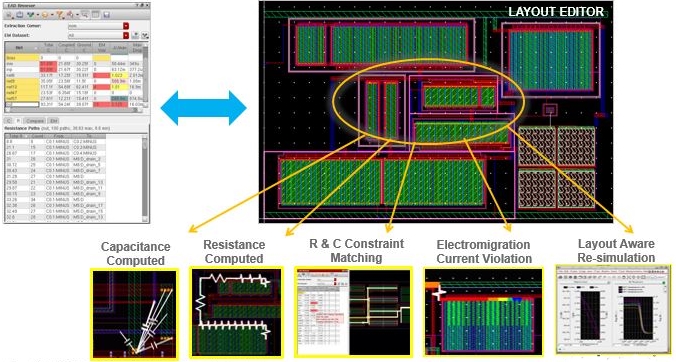
It's a suite of new licenses inside Virtuoso that helps the user analyze,
simulate, and verify interconnect decisions in real time.
 (click to enlarge pic)
|
EAD has an interactive engine that shows on the screen to the user all the
needed currents restrictions vs. process information.  Its first intention
is to help the user who needs to place and route devices while maintaining
electrical constraints as he works on the circuit.  EAD handles all of your
constraint electrical parameters like R, C, EM. IR, etc. and it works down
to 7nm.  You're routing a signal net, or power line, -- and then getting
live on the screen in real time R, C, EM values while you draw it.  :)  It
can run batch mode for big designs or complex cases, but EAD's strength is
its ONLINE help.

Being integrated in Virtuoso's platform, EAD gets all EM check currents that
come from Virtuoso ADE-XL simulation so going back and forth (to simulator)
is a breeze.

Like in the past for power plots, Virtuoso EAD produces signal analysis as
a live color coded view of all of your violations -- colored according to
how bad each violation is.

One amazing thing in my opinion is that EAD extracts PEAK, DC, AVERAGE and
RMS currents and has the flexibility to define operation temperature for EM!
This is something no human can do without tremendous effort in post-layout
simulation.  (So EAD definitively reduces design work and layout rework.)

One of my pet peeves in layout is architecture exploration.  The ACPD flow
in Cadence had some features that try to do that.  With EAD, you can run on
partially finished layout, and back annotate to schematics before layout is
done.  EAD is like the ACPD flow on steroids.

Cadence is adding more to EAD as we speak, like Power Ground mesh analysis,
interactive point to point R probing, C extraction value, LDE analysis...

EAD is not a signoff tool, but it's very useful during layout and it can
definitively reduce your rework efforts when dealing with special current,
low technologies with a process constraints, etc.   Later, outside of EAD
you'll have to add your top level, additional interconnects, dummy metals
for metal density, and chip finishing issues, etc.

         ----    ----    ----    ----    ----    ----    ----

DAN CLEIN'S BEST-IN-CLASS FULL CUSTOM FLOW

If I could, I would build a best of each in my perfect flow:
|
architecture exploration,
area estimation, floorplanning
|
Animate
|
Pulsic - but I would like somehow to get EAD features in it
|
|
placement and special analog/RF control
|
MODGEN
|
Cadence
|
|
routing
|
Virtuoso EAD online router
|
Cadence
|
|
full custom for ECOs
|
Virtuoso DRD
|
Cadence
|
co-design with
IC Compiler II
|
Custom Compiler
|
Synopsys
|
|
co-design with Innovus
|
Virtuoso
|
Cadence
|
on the fly
GDSII DRC
|
Calibre RealTime
|
Mentor/Siemens
|
final sign-off
GDSII DRC/LVS
|
Calibre nmDRC/nmLVS
|
Mentor/Siemens
|
I'm looking forward what the upcoming DAC'17 brings in full custom tools.

    - Dan Clein
      Sankalp Semiconductor Pvt Ltd              Ottawa, Canada

P.S. I'll be in the Sankalp DAC booth #1915 if anyone wants to chat.  :)

         ----    ----    ----    ----    ----    ----    ----

|
Dan Clein has 33 years experience doing full custom and AMS layout. His "CMOS IC Layout" is considered a key reference book in full custom chip design. To reach Dan email him at cometic@ieee.org.
|
Related Articles

    Marmaduke's AMS circuit designer's Austin DAC'16 Trip Report
    What's REALLY up on new Virtuoso ADE and Custom Compiler
    CDNS admits DeepChip rumor right on Virtuoso ADE 12.X spilt
Join
Index
Next->Item
|
|