( ESNUG 577 Item 2 ) ---------------------------------------------- [10/27/17]

Subject: Calibre scales 2,048 CPUs 16nm 700mm2 full chip DRC in 3.5 hours
Sawicki: "... we saw the CDNS Pegasus announcement, and
it's like "oh, the default tool [Calibre] does not scale." Well that's
delusional. Calibre's scaling out to... I've got tests with certain
customers out to 1,000 CPUs."
"Now let's be clear. No customer on the planet wants to have to
use 1,000 CPU's on a runset! We got people out to 7nm test
stuff going on right now. About the most we got from our biggest
customer is about 200-240 CPU's."
"No one wants to have a lot of CPUs. What they want is an
overnight DRC turnaround time and that's what we've been
concentrating at MENT on for years. So, I am comfortable in our
Calibre technical positions. We've talked about before
that our competitor for ages has not been another DRC tool,
it's been the node."
- from Anirudh vs Sawicki on the CDNS Pegasus DRC launch
From: [ Michael White of Mentor-Siemens ]

Hi, John,

I saw on DeepChip where Anirudh had launched the Cadence Pegasus DRC tool
with all his many jabs at Calibre.

   Anirudh's 19 jabs at Joe Sawicki's Calibre with his Pegasus launch

I wanted to follow-up on his jabs, but got distracted with getting ready
for DAC'17 in Austin.  Now I see that jabbing issue is still active with
the DAC Troublemakers Panel in:

   Anirudh, Sawicki, Hogan go at it over the CDNS Pegasus DRC launch

and since this is my boss's boss (Joe Sawicki) who made these technical
claims about multi-CPU Calibre runs -- and knowing how you, John, personally
doubts anything an EDA vendor says unless we 100% prove it to you, I thought
I'd detail exactly how to do hyperscaled 1,000 CPU Calibre runs in under
5 hours, etc.

First, some insights:

  - Joe is right.  Our MENT Calibre has been leading in the DRC/LVS
    market for over 20 years now.


    If you're using MENT Nitro-SoC, or SNPS ICC/ICC2, or CDNS Innovus,
    or even the Atop/Avatar tool for digital PnR, there's a 99.9% chance
    you used Calibre as your golden DRC signoff if you were designing
    anything for a TSMC, GlobalFoundries, Samsung, Intel, or UMC process.
    The same is true for full custom layout using Cadence Virtuoso or its
    Synopsys equivalents.

  - Anirudh was wrong when in his 19 jabs he implied that Calibre does
    not run on AWS.  For the record, Calibre nmDRC:

        1.) runs on a single box running multi-CPUs,
        2.) runs distributed LSF processors on internal server farms,
        3.) runs VPN to external clouds like AWS.

    We've been any early proponent of cloud use for DRC runs.  In no
    way, shape, or form Cadence was the first to go cloud for DRC work.

  - Joe was right when he said last year in ESNUG 563 #1:

        "We have probably rewritten our parallelization engine
         inside Calibre...  Hmmmm...  At least 6 times."

             - Joe Sawicki, DAC'16 Troublemakers Panel

    Why I say this is relative to us, Anirudh's people are newbies to
    doing this in the DRC space.

Also, since our Calibre nmDRC runs get significantly faster every quarter,
the benchmark data I present here is probably now faster.

This is a quick summary of configuring an efficient Calibre run.  We will
follow up with a similar how-to to run Calibre in Virtuoso, Innovus, and
IC Compiler II -- so stay tuned.


HOW TO SET-UP A TYPICAL 100 CPU 16/14nm FULL CHIP CALIBRE DRC RUN

The best settings to run full-chip DRC on a typical 12/14/16nm design that
is roughly 125mm2 in size.

[ Editor's Note: to get a feeling for this size, here's three commonly known
  chips in the 80mm2 to 125mm2 size range:

|

|

|
|
Apple A9
|
Snapdragon 820
|
Exynos 7420
|
|
104.5 mm2
|
113.7 mm2
|
78.23 mm2
|
  Later in this write-up Michael goes into how to do DRC runs for big ass
  chips in the monster 700+ mm2 size range.  - John ]

  1.) Set up your environment, networks, and machines.

      a. OS.  RedHat RHEL 6.7 6.8 7.1 7.2 or SUSE LES 11sp2 11sp3 11sp4.
         We also support other Linuxes if you don't have these.

      b. Server Hardware.  Get servers with Xeon 5500 processors or those
         based on the P4 microarchitecture, or anything else is good as
         long as it supports hyperthreading.

           - your one Master Server machine requires:

                     RAM: 0.5 - 1 TB
                    CPUs: 16 CPUs

           - your multiple Remote Slave Server machines require:

                RAM/core: at least 4 GB/core
                    CPUs: total of 64 - 96 CPUs

         Be sure you have real physical 10Gb/sec network cards.  The small
         money you save using slower networks is lost on the collective
         man-hours of engineering costs wasted with your engineers waiting
         for results.

      c. Set-up Intel Hyperthreading on all machines.

         This option is enabled or disabled through the BIOS setting of
         your server hardware.  Hyperthreading is enabled by default.

            - Enable hyperthreading in your system BIOS.  Some server
              manufacturers label this option "Logical Processor", while
              others call it "Enable Hyperthreading".

            - Also turn on hyperthreading for your ESX/ESXi host.

                a. In the vSphere Client, select the host and click
                   the "Configuration" tab.

                b. Select "Processors" and click "Properties".

                c. In the dialog box, you can view hyperthreading
                   status and turn hyperthreading off or on (default).

         Hyperthreading is now enabled.

         NOTE: Hyperthreading is optional.  It can help if you are still
         not hitting overnight and you have not hit max scaling, but
         physical CPU cores are always better than virtual CPUs.  You do
         not have to enable the virtual.  Some users do not because it
         can make problems for other tools run on the same hardware.

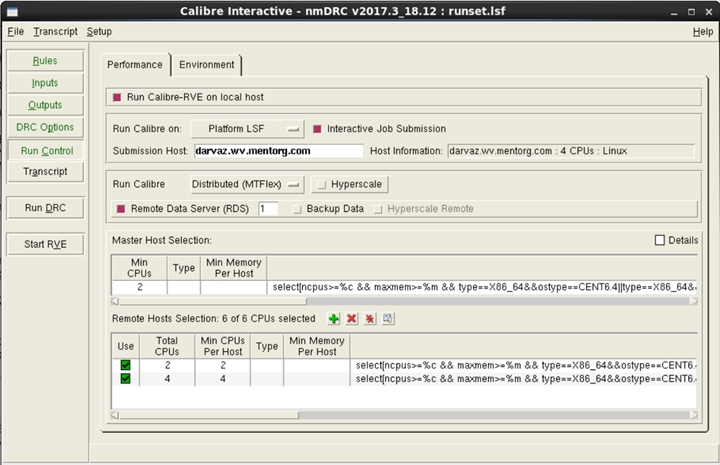
      d. Set-up your Platform, GitHub, or Altair Runtime LSF SW.

         Calibre is set up as a master-slave system.  Users can launch
         from the master to LSF.)  From there, the master can launch to
         LSF for the remote slave servers.  The same approach can be
         applied for any style of load balancing platform.
(click on pic to enlarge image)
|
         While the exact setup details are provided in detail in the
         Calibre User's Manual, here is a brief summary of the 5 ways
         to invoke Calibre into load sharing environments.

           - The Basic Approach
               - Launch overall Calibre (master) as normal from
                 the load sharing system
               - Master launches for remotes to load sharing system

           - Batch Calibre runs
               - Setting remotes enabled through command-line settings
               - User provides load sharing syntax and desired settings
                 through simple script

           - GUI Calibre runs (Calibre Interactive)
               - User specifies HW requirements directly in the GUI
               - Auto-generates LSF specific settings for launchings

        The benefits of this LSF approach it can support any load sharing
        platform or customized settings; and the Calibre user can easily
        re-use their settings for each run.

  2.) Set-up the mode of Calibre you're using.

      Calibre version: For best performance use the very latest Calibre
      version qualified by the foundry.  Calibre 2017.2 (Q2CY17 release
      is the most current)

      Calibre's 5 run modes: Hierarchical, MTFlex, Remotedata, Hyper,
      Hyper Remote.  Hyper Remote is recommended for large full-chip
      runs at advanced nodes.

            calibre -drc -hier -turbo -hyper remote -remotedata \
                    -remotefile remote_file rule_deck

  3.) Always use the latest foundry decks.

      Some foundries Calibre qualify their deck twice a year.  Others
      qualify their decks every quarter.  It is crucial to always use
      the latest foundry deck your fab offers!

As I said earlier, these are the basic steps for the best settings to run a
full-chip DRC on a typical 12/14/16nm design that is roughly 125mm2 in size.

Here's recent results we find using these settings:

  Design "application processor XYZ"

         Physical size: 98 mm2
       OASIS file size: 8 GB
               Runtime: 5.34 hrs
             CPUs used: 16 master CPUs + 96 slave CPUs == 112 CPUs total

These were virtual AWS machines with the Intel Xeon E5-2670 v2 (Ivy Bridge).

        ----    ----    ----    ----    ----    ----   ----

SETTING-UP 64-to-2048 CPU 16/14nm FULL CHIP CALIBRE DRC RUNS

Above, I gave you the detailed instruction to do a typical 100 mm2 16nm
DRC run in around 5 hours.  Next, I want to explain how to use AWS and
Calibre to see how far the Calibre could scale using a 16/14nm production
ASIC design.


This real customer design used was huge: greater than 700 mm2 (full field
reticle), 14 GB of OASIS data, and a flat geometry count of 400+ billion
shapes.  The experimental setup provided below uses Amazon AWS.  We would
expect similar or better performance results if run on internal servers.

See above step 1, parts a, b, c, d, e.  Much is the same *except* for these
differences:

  - Environment

      Network: AWS enhanced network.  Up to 10Gb/sec virtual network
      interface.  In reality, this is a bit slower than real physical
      10Gb/sec network cards.

      OS: CentOS 6.7 (compatible to RedHat 6.7)

  - Hardware

      Master (AWS VM):
        CPU model: Xeon CPU E5-2670 v2 2.5 GHz, total cores 16,
                   with Hyperthreading on.
              RAM: 244 GB

      Slave Remotes (AWS VM):

        CPU model: Xeon CPU E5-2670 v2 2.5 GHz, total cores 8,
                   with Hyperthreading on.
              RAM: 120GB.  Total counted as 16 cores because
                   Hyperthreading was on - so 7.5GB/core.

      NOTE: you don't have to use these exact slave remotes.  You can use
      whatever you want.  This is just what we happened to launch on into
      the AWS cloud environment.

      A 64 CPU config used 1 master server + 3 remote slave servers.  The
      2,048 CPU config used 1 master server + 127 remote slave servers.
      The obvious granularity was based on sets of 16 CPUs based on the
      slave remotes CPU counter-per-machine.

  - Calibre

      Calibre version: 2016.2_18.12  (The latest released Calibre version
      when the tests was conducted.)

      Calibre run modes: Hierarchical, MTFlex, Remotedata, Hyper Remote

  - Foundry Deck

      V1.0+ foundry deck for 16nm from February 2016.

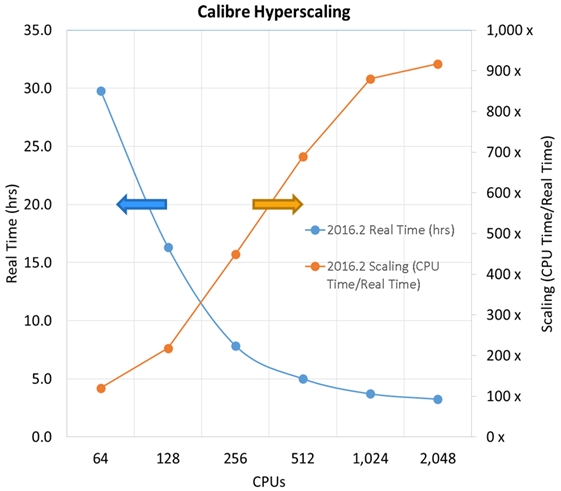
And here's the plot scaling results for our 16nm, 700+ mm2 experiment:


Looking at this above plot, I want to point out three important data points
for Calibre DRC users.

    1. an overnight 12 hour run only needed ~150 CPUs.
    2. at 2,048 CPUs, the runtime was ~3.5 hours.
    3. for most of the graph, DRC runtime nicely scales as you
       up the # of CPUs used.

and again this is for a *massive* 700+ mm2 16nm chip!

NOTE: while Calibre can scale to thousands of cores, this is extravagant
and NOT needed.  As you can see, Calibre met overnight runtimes with 150
total remote CPU cores.  This is a key difference between our approach
and the Pegasus approach.  The Calibre goal is:

  1. first make the whole DRC/LVS job run in the minimal CPU clock
     cycles possible,
  2. second parallelize those clock cycles.

The Cadence Pegasus claims appears to be "don't worry about how many clock
cycles it takes", and "just throw more and more CPUs until you finally get
there."  (Prompting we Calibre folk to ask: "but why use a 1,000 CPUs if
you can get the job done in much less?")

Anyway, I hope this puts to bed Anirudh's implications that Calibre was
not scalable, not keeping up, and not used in the cloud.  He couldn't
be more wrong about that.

    - Michael White
      Mentor-Siemens                             Wilsonville, OR

P.S. Has anyone actually seen CDNS Pegasus at any customer site anywhere?
     So far Pegasus appears to still be a mythical beast.  We're still
     not seeing it anywhere.

        ----    ----    ----    ----    ----    ----   ----

| Michael White lives in an airplane visiting Calibre users all over the world. Prior to MENT, Michael worked at Applied Materials, and prior to that at the Lockheed-Martin Skunkworks.
|
Related Articles

    Anirudh's 19 jabs at Joe Sawicki's Calibre with his Pegasus launch
    Anirudh, Sawicki, Hogan go at it over the CDNS Pegasus DRC launch
    Juan Rey -- The Most Interesting Man in EDA about the Future of DRC
    How to get Calibre sign-off in batch mode inside SNPS IC Compiler
Join
Index
Next->Item
|
|